A site where
your work comes first.
Genva Craft is for makers who work on their own. Photographs lead. Online shops, stockists and orders sit together in one place, and every work can have a button to buy it, a button to ask about it, or both.
9,800 JPY (≈ $62) Sales run from time to time
- No plugins required
- Dark mode toggle
- Two front pages
Why
“Where can I buy this?”
Answered on one page.
A maker’s pieces are sold in many places at once: online shops, stockists, markets. So the theme gathers where to buy and how to ask in one place, and visitors never have to hunt for it.
-
01
Photographs lead
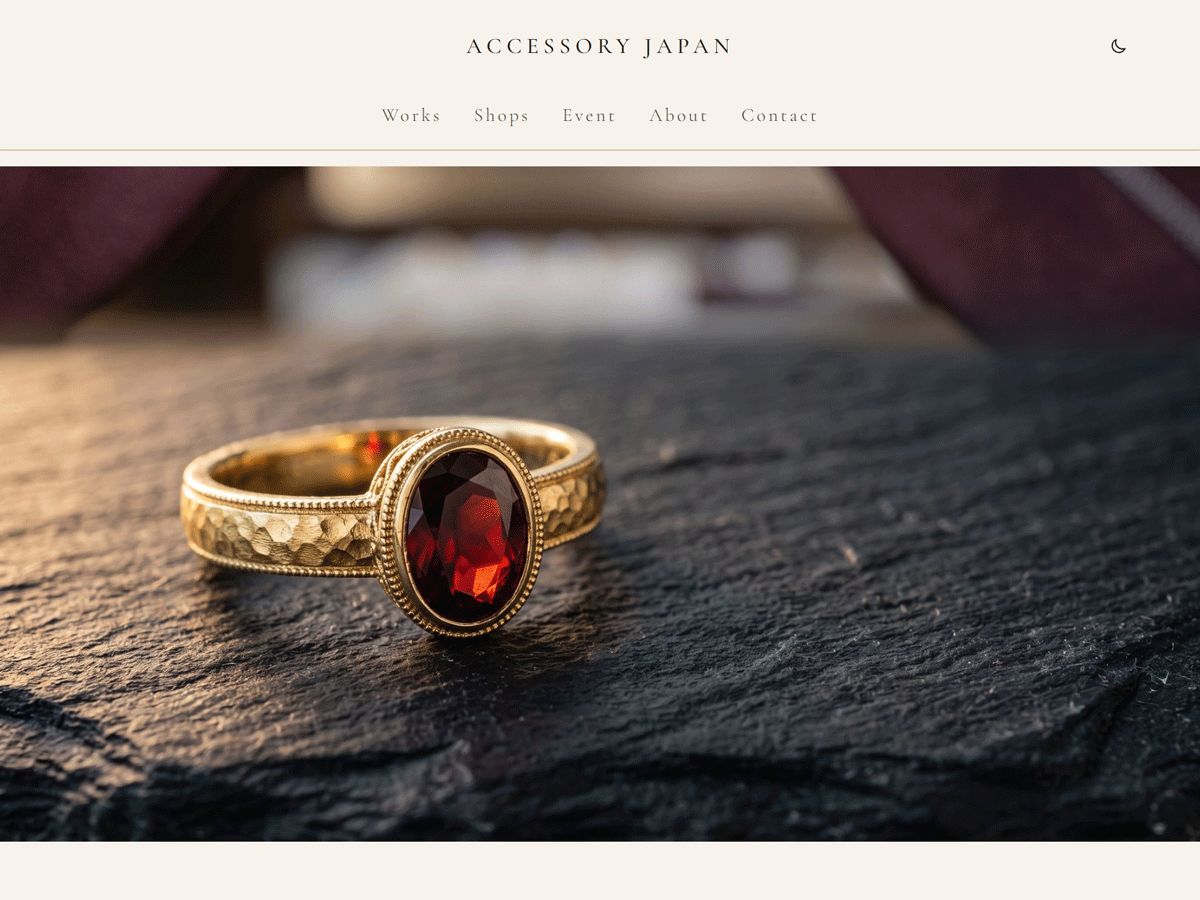
The front page opens with a full-width photograph. Text and ornaments stay quiet.
-
02
Where to buy, in one place
Online shops, stockists and orders sit side by side in a single section.
-
03
Two buttons on every work
“Buy on minne” and “Ask about this piece”. Keep both, or only one.
-
04
Markets and exhibitions
Upcoming events show their date large. Past events can be greyed out.
Features
Features
Works are posts. Where to buy and the maker’s story are pages. The only thing that keeps growing is your works.
-
SHOP LINKS
Social and shop links, entered once
Enter your Instagram, X, Facebook, LINE, minne, BASE and Creema addresses in Appearance > Shop Links, and their icons appear in the footer. Empty ones are not shown.
-
FRONT PAGE
Two front pages
One for makers who sell finished pieces, one for makers who take orders. Choose when you create the page.
-
WORK
A starter for each work
Four photographs, a table of material and size, a description and the buttons. Leave the price empty and its row disappears.
-
GALLERY
Tap to swap photographs
On a work’s page, tapping a small photograph swaps it with the large one. The large one opens full screen.
-
WORKS LIST
Masonry or bento
A masonry that follows each photograph’s height, or a bento grid of large and small tiles. Switch with a block style.
-
STYLE & DARK
Three colour schemes and dark mode
The default ivory and gold, plus Noir and Bordeaux. Each has its own dark colours.
Front Page
Made and sold,
or made to order
Choose a starter in Pages > Add New and the whole front page goes into the content. Every section is ordinary blocks, so you can reorder or delete them.
Each section is also a pattern of its own, for adding one later.
Front page: made and sold
For makers who sell finished pieces online and at markets
- HeroA wide photograph, the maker’s line and two buttons
- New worksThe six most recent works, read from the posts
- Where to buyOnline, stockists and orders in three columns
- EventsUpcoming markets, with the date set large
- About the makerThe workbench and a short introduction
- WorkshopA notice for classes at the workshop
Front page: made to order
For makers who take orders and make each piece one at a time
- HeroA wide photograph, the order line and a button
- Order statusWhether orders are open, and how long they take
- Past worksExamples of what can be ordered
- How an order worksThe steps as a vertical timeline
- Remakes and repairsRemaking inherited jewelry, and repairs
- AtelierWhere and when meetings take place
- Ask about an orderOne button to the contact page
Pages
Every page you need,
from a pattern
Open Pages > Add New and a pattern picker appears. Use the slugs below, and the links in the menus and on the buttons work without editing.
| Page | Slug | Pattern to pick |
|---|---|---|
| Home | home | Front page: made and sold / made to order |
| Works (list) | works | None (set it as the posts page) |
| Where to buy | shops | Page: Where to buy |
| Events | events | Page: Events |
| About | about | Page: About |
| Orders | order | Page: Orders (if you take orders) |
| Contact | contact | Page: Contact |
Each work: four photographs and a details table
Works are written as posts. Choose the “Work” pattern in a new post: photographs on the left; category, title, a table of material and size, a description and the buttons on the right.
Each work can have a price. Leave it empty and the price row is not shown at all. Tags such as “Sold” or “Made to order” appear as small badges on the card in lists.
Mobile & Dark
On a phone, and at night
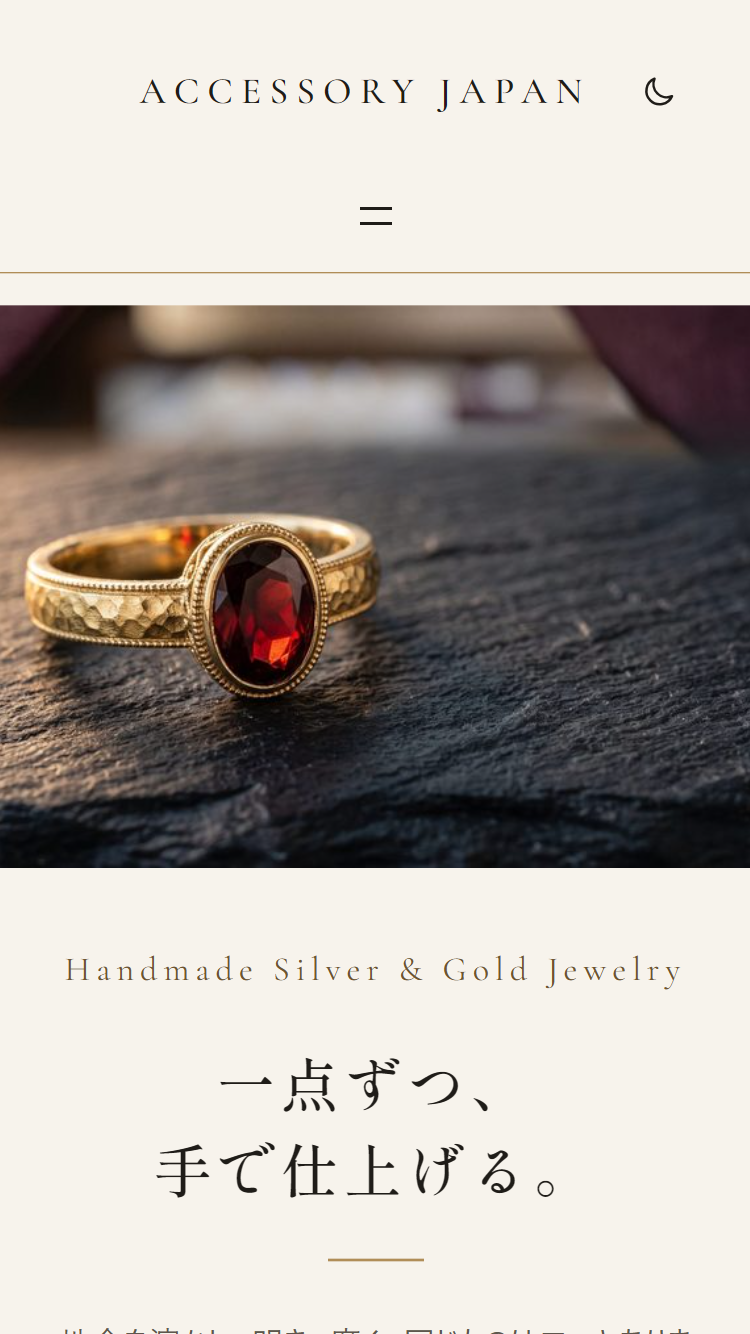
Large photographs on a phone, too
On narrow screens the menu folds into a single button. Photographs keep the full width of the screen.
Headings are set in a Mincho typeface and Latin text in a slender serif. Both are bundled with the theme, so no external font service is used.
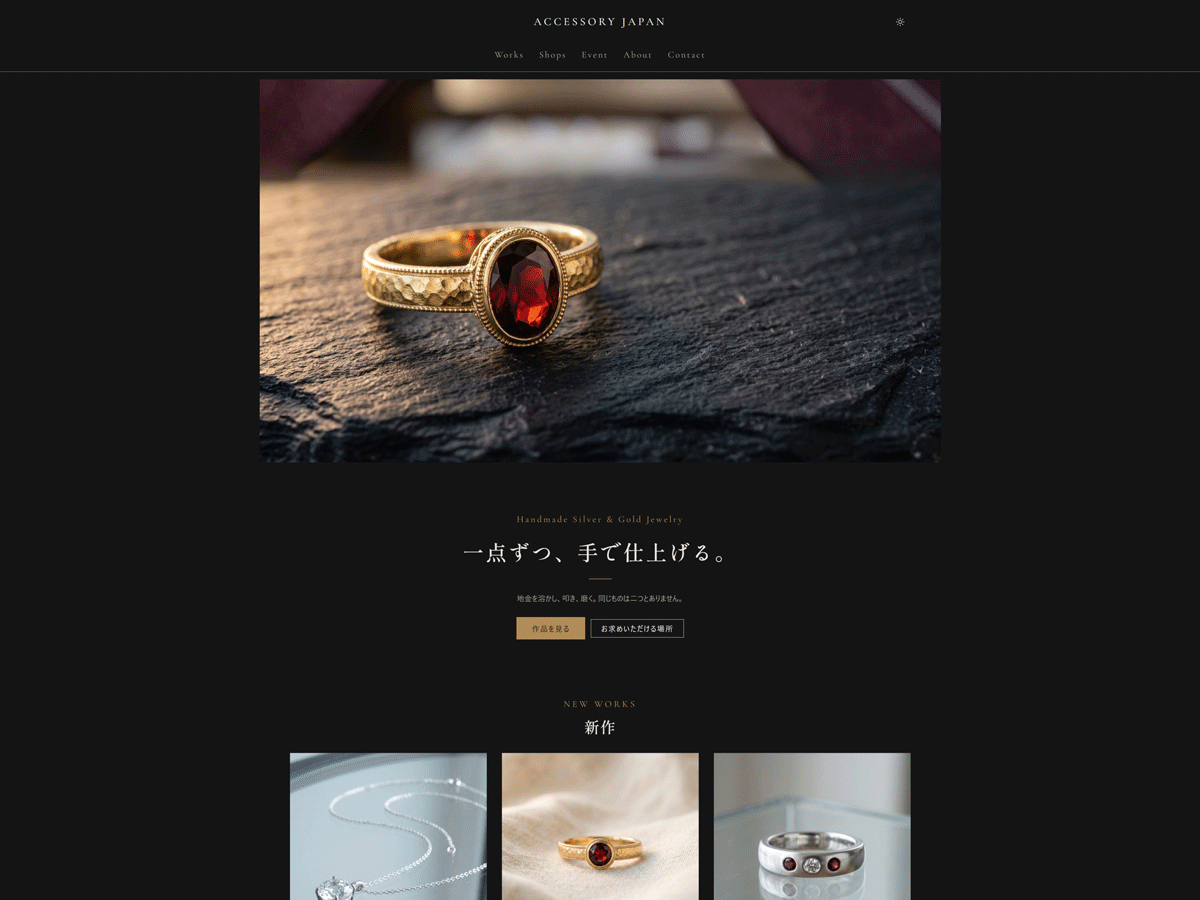
Dark mode, with gold as the accent
In the dark colours, buttons, Latin labels and lines turn gold. Every text colour has a contrast of 4.5:1 or more against its background.
Visitors choose dark mode with the button in the header. It does not follow the device setting.
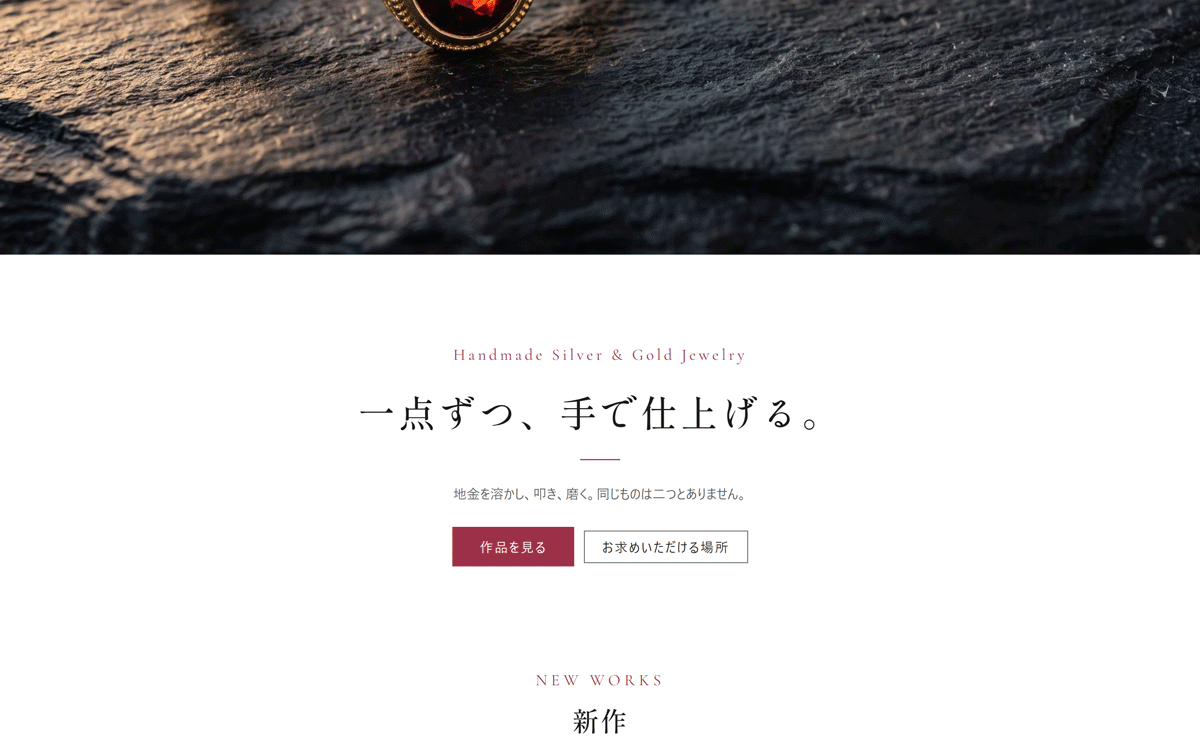
Noir and Bordeaux, too
Choose them in Appearance > Editor > Styles. Noir is set on black; Bordeaux is white with a bordeaux accent. Both have their own dark colours.
Setup
Set it up in this order
Everything happens in the WordPress admin. No code to write.
-
Activate
Upload the zip and activate the theme.
-
Shop links
Enter the addresses of the social accounts and shops you use.
-
Your name
The site title appears in the header and the footer.
-
Permalinks
Choose “Post name” and save.
-
Front page
Pick one of the two starters and set it as the homepage.
-
Works list
Create an empty “Works” page and set it as the posts page.
-
Other pages
Pick a pattern and publish with the slug in the table.
-
Contact form
Place your form plugin’s block in the frame on the Contact page.
Step-by-step instructions are in the documentation (Japanese). The readme.txt in the theme has the same steps in English.
Spec
Requirements
No external font service is used. Shippori Mincho for headings and Cormorant Garamond for Latin text are bundled with the theme; body text uses the visitor’s system fonts.
| Theme type | Block theme (full site editing) |
|---|---|
| WordPress | 6.7 or later (tested with 7.1) |
| PHP | 7.4 or later |
| Required plugins | None (a form plugin only if you add a form) |
| Updates | From the WordPress admin |
| Languages | English, with a Japanese translation included |
| License | GNU General Public License v3.0 or later |
| Version | 1.0 |
FAQ
Frequently asked questions
Are the demo photographs included?
No. The photographs on the demo site and in the screenshots are AI-generated images and free stock photographs. The theme includes three placeholder images (SVG). Replace them with photographs of your own work.
Does the theme include an online shop?
No. Payments and stock are left to shops such as minne, BASE and Creema. The buy button on each work takes visitors to that piece in your shop.
Is there a contact form?
No. Sending mail is a plugin’s job. The Contact page has a marked frame where you place your form plugin’s block.
How do I show that orders are paused?
On the order status band, change “Taking orders” to something like “Orders are paused until March”.
How do I mark an event as ended?
Select the event’s group, open Advanced in the sidebar, and add events__item--past to Additional CSS class(es). The date turns grey and the day is struck through.
How do I switch the works list to the bento grid?
In Appearance > Editor > Templates, open the works list template, select the Post Template block and choose “Bento” under Styles. Choose “Default” to go back to the masonry.
Does dark mode follow my computer’s setting?
No. Visitors switch it with the button at the right of the header. Their choice is kept in their browser for the next visit.
Will theme updates erase my edits?
No. Edits made in the Site Editor are stored in the database, so updates do not erase them. A template saved once, though, stops following the theme’s file. To go back, choose “Clear customizations”.
Price
Genva Craft
9,800 JPY (≈ $62)
Sales run from time to time. See the product page for the current price.
- Two front page starters
- Five page starters
- A starter for works (the price row shows only when filled)
- Thirteen sections usable on their own
- Social and shop links, entered once
- Three colour schemes and a dark mode toggle
- Updates from the WordPress admin
Genva Series
A series for makers and trades
For Interior Finishers
Genva Interior
A block theme for tradespeople who replace wallpaper and flooring. Service pages, a price guide, an about page, and a contact page are ready the moment you pick a pattern.
See Genva Interior →For Carpenters
Genva Carpenter
A block theme for independent carpenters who take work directly from homeowners. Current availability sits at the top of the front page, and projects list themselves once posted.
See Genva Carpenter →